Step into a boundless digital studio with Pixel Canvas Art Creator, an intuitive drawing sandbox crafted for artists, retro gaming fans, and pixel art enthusiasts alike. Breaking free from pre-made templates and restrictive guidelines, this tool gives you total creative control over a pristine digital grid. Transform blank square canvases into vibrant retro sprites, detailed character avatars, iconic emblems, or elaborate isometric landscapes. With an easy-to-use color palette and precise grid tools, anyone can relax, unleash their imagination, and experience the nostalgic joy of crafting pixelated artwork from the ground up.
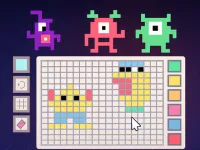
The core mechanics center around accessible, precise pixel manipulation. Players have access to a rich color selector featuring diverse shades and custom tones, allowing for intricate color blending and shading techniques. The grid interface allows seamless single-pixel placement as well as smooth drag-to-draw functionality for filling larger areas efficiently. Erase accidental strokes easily, switch between contrasting hues, and refine your artwork with pixel-perfect accuracy. Designed for both casual doodling and meticulous design work, the interface provides responsive tools that turn your artistic ideas into polished digital images.
To elevate your pixel creations, start by sketching clear silhouette outlines before filling in solid base colors. Utilize light and dark color variations within the palette to add realistic shading, highlights, and depth, giving flat shapes a vibrant three-dimensional quality. Dither adjacent colors to create smooth gradient transitions across larger surface areas. Once your retro artwork is complete, save your canvas masterpiece directly to your device and share your digital creations with friends to demonstrate your blossoming artistic talent.
Select colors from the bottom palette using your mouse cursor or touch screen, then click or tap individual grid squares to place pixels and create your design. Hold and drag across the canvas for continuous line drawing or use the eraser tool to correct mistakes. Your goal is to design custom pixel artwork from scratch, refine details, and export your completed visual creations.
Pixel Canvas Art Creator delivers an exciting Arcade Games experience designed for smooth gameplay across Desktop, Mobile, and Tablet browsers. Enjoy responsive controls, high frame-rate performance, and instant session loading with zero installation required.
Yes, Pixel Canvas Art Creator is 100% free to play directly in your browser on Playing.co.in. No download, registration, or payment is required.
Yes! Pixel Canvas Art Creator is built using HTML5 technology and runs seamlessly across smartphones, tablets, and desktop computers.
Watch gameplay walkthrough, learn strategies, and master every level of Pixel Canvas Art Creator.
15-Second Archer: Pixel Survival
Advanced pixel apocalypse 3 2022
Anime Pixel Art Color By Number

Arcane Survivor: Pixel Mage

Beverage Run: Pixel Dash
Block Fireteam Combat: Pixel Strike
Block Idol Pixel Painting

Block Strike Arena: Pixel Warfare
Blocky Combat Arena: Global Pixel Warfare
Blocky combat Shooting Arena 3D Pixel
Blocky Combat: Pixel Gunner
Blocky Pixel