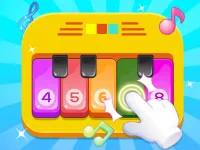
Introduce young minds to the magical world of rhythm, sounds, and harmony with this interactive musical playground. Designed specifically for children, this educational simulator transforms your computer keyboard or touch device into a vibrant, multi-colored piano. Kids can explore different instrument sounds, play classic nursery rhymes, and compose their own original melodies in a highly engaging, visual environment that encourages creative expression.
The game features several interactive modes that cater to different stages of musical development. In the song learning mode, guided visual cues show children exactly which keys to press to play familiar tunes, fostering hand-eye coordination. Alternatively, the free-play mode allows unrestricted experimentation with various sounds, including traditional piano keys, xylophones, drums, and even playful animal noises that make learning delightful.
Beyond simple entertainment, this educational application serves as a highly valuable cognitive tool for early childhood development. By associating specific musical pitches with bright, distinct colors on the keyboard, children naturally develop color recognition, hand-eye coordination, and basic pitch memory. The intuitive interface ensures that even toddlers can navigate the menus and start making music immediately without parental frustration, promoting confidence.
Parents can actively participate by playing simple duets with their children or encouraging them to record and playback their compositions. There are no high scores or stressful timers, allowing kids to learn at their own comfortable pace. It is the perfect, child-friendly introduction to music theory that will inspire a lifelong love for playing musical instruments.
Interact with the virtual piano keys by clicking on them with your mouse or tapping directly on your touch screen. Alternatively, you can use your computer keyboard's row of letter keys to play notes. Select different instruments and songs from the colorful top menu using clicks or taps. Your objective is to follow the guiding lights to play songs or create your own melodies.
Tiny Tunes: Kids Piano & Melody Maker delivers an exciting Hypercasual Games experience designed for smooth gameplay across Desktop, Mobile, and Tablet browsers. Enjoy responsive controls, high frame-rate performance, and instant session loading with zero installation required.
Yes, Tiny Tunes: Kids Piano & Melody Maker is 100% free to play directly in your browser on Playing.co.in. No download, registration, or payment is required.
Yes! Tiny Tunes: Kids Piano & Melody Maker is built using HTML5 technology and runs seamlessly across smartphones, tablets, and desktop computers.
Watch gameplay walkthrough, learn strategies, and master every level of Tiny Tunes: Kids Piano & Melody Maker.